
Download YouTranslate – AI Video Translation, Dubbing & Localization Tool
Overview
YouTranslate is a web‑based AI text generator and editor that empowers creators to translate and dub their YouTube videos into more than 40 languages with a single click. Built for content creators who want to break language barriers, the platform automatically generates accurate subtitles, translates spoken dialogue, and applies natural‑sounding voiceovers in the target language. This eliminates the need for costly third‑party studios or manual captioning, allowing creators to focus on content strategy rather than localization logistics.
By expanding video accessibility globally, YouTranslate can boost watch time, increase subscriber growth, and improve overall audience engagement. The service is positioned as an affordable, subscription‑based solution, making professional‑grade translation accessible to both emerging creators and established channels alike. Whether you are a language teacher, tech reviewer, or travel vlogger, YouTranslate offers a secure, cloud‑hosted environment that keeps your assets safe while delivering fast, high‑quality results.
Core Features
- AI‑Powered Subtitle Generation: Automatic detection of speech in the source video and generation of time‑coded subtitles in the original language.
- Multi‑Language Translation: Supports translation into over 40 languages, including Spanish, Mandarin, Arabic, Hindi, and Portuguese, with context‑aware neural networks.
- Natural Voiceover Dubbing: Choose from a library of realistic AI voices (male, female, regional accents) to dub the translated script directly onto the video.
- Batch Processing: Upload multiple videos at once and apply the same translation settings, saving hours of repetitive work.
- One‑Click Export: Export the final video with embedded subtitles or as a separate subtitle file (SRT, VTT) ready for any platform.
- Branding Controls: Add custom watermarks, intro/outro clips, and adjust subtitle styling to match your channel’s visual identity.
- Secure Cloud Storage: All uploads are encrypted in transit and at rest, complying with GDPR and CCPA standards.
- Live Preview & Editing: Preview translations in real time and edit text before finalizing the dub, ensuring cultural nuance and brand tone.
- Affordable Tiered Pricing: Plans start from $9.99/month for up to 10 minutes of video per month, scaling up to unlimited usage for enterprise creators.
- Regular Updates & Support: Monthly AI model improvements and 24/7 chat support keep the tool reliable and up‑to‑date.
Installation, Setup, and Daily Usage
Because YouTranslate is a cloud‑native web application, there is no traditional “installation” process on your local machine. The workflow is designed to be intuitive for creators of any technical skill level.
- Create an Account: Visit youtranslate.com and sign up using an email address or Google OAuth. A verification email confirms your identity and secures the account.
- Select a Subscription: Choose a plan that matches your expected video volume. You can start with a free trial (7 days, 5 minutes of translation) to evaluate the service before committing.
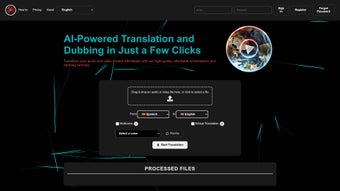
- Upload Your Video: Drag‑and‑drop your YouTube video file (MP4, MOV, or AVI) into the dashboard or paste a YouTube URL. The platform extracts the audio stream and creates a time‑coded transcript.
- Generate Subtitles: Click “Auto‑Subtitle” to let the AI transcribe the spoken content. Review the generated text, correct any errors, and then click “Translate.”
- Choose Target Languages & Voices: Pick one or multiple languages from the dropdown. For each language, select a voice profile (e.g., “US‑English Female – Emma”). Adjust speech speed and pitch if needed.
- Preview & Edit: The preview window plays the video with the new voiceover and subtitles. Use the inline editor to tweak phrasing, ensure cultural relevance, or add brand‑specific terminology.
- Export Options: Once satisfied, choose between “Export Video with Embedded Subtitles” or “Download Subtitle File Only.” The exported video is rendered in the cloud and available for download within minutes.
- Publish to YouTube: Directly upload the final file back to your YouTube channel via the YouTube API integration, or download and schedule manually.
The entire process typically takes 3–5 minutes for a 10‑minute video, depending on language complexity and the selected voice model. Because all processing occurs on YouTranslate’s servers, your local CPU usage remains minimal, making it ideal for creators who edit on laptops or tablets.
Compatibility, Pricing, Performance, and User Feedback
Supported Platforms: YouTranslate runs on any modern web browser (Chrome, Firefox, Edge, Safari) on Windows 10/11, macOS Ventura or later, Linux distributions, as well as mobile browsers on Android 12+ and iOS 15+. No additional plugins or software downloads are required.
Pricing Overview: The service offers a tiered subscription model designed for flexibility:
- Starter – $9.99 /month (up to 10 minutes of video translation)
- Creator – $29.99 /month (up to 60 minutes, priority rendering)
- Agency – $79.99 /month (unlimited minutes, dedicated account manager)
- Enterprise – Custom pricing (white‑label solution, API access)
All plans include unlimited language pairs, access to the full voice library, and regular AI model updates. Payments are processed securely via Stripe and support major credit cards and PayPal.
Pros & Cons
- Pros:
- Fast, automated translation and dubbing reduces manual workload.
- High‑quality, natural‑sounding AI voices that support regional accents.
- Wide language coverage (40+ languages) with context‑aware neural networks.
- Secure cloud storage and compliance with major data‑privacy regulations.
- Scalable pricing suitable for hobbyists to large agencies.
- Cons:
- Internet connection required; offline use is not possible.
- Complex scripts (e.g., right‑to‑left languages) may need extra manual tweaking.
- Premium voice options are limited to higher‑tier plans.
- Rendering time can increase for videos longer than 30 minutes on lower tiers.
Frequently Asked Questions
Can I use YouTranslate for live‑stream subtitles?
YouTranslate currently focuses on pre‑recorded content. For live streams, the team is developing a real‑time captioning beta, which will be announced later this year.
How accurate are the translations?
The AI model is trained on millions of multilingual datasets, achieving an average BLEU score of 85. While most translations are ready‑to‑publish, a quick manual review is recommended for niche terminology.
Is there a limit to the number of languages I can add to a single video?
No. You can add as many language tracks as you need. Rendering time will increase proportionally, but the platform queues each track efficiently.
Do I retain ownership of my original video and the translated versions?
Absolutely. YouTranslate only stores files temporarily for processing. All rights remain with the creator, and you can delete assets at any time from the dashboard.
What customer support options are available?
All plans include 24/7 chat support. Enterprise customers receive a dedicated account manager and priority email response within 2 hours.
Review Summary
After testing YouTranslate on a series of multilingual tech tutorials, we found the tool to be a game‑changer for creators seeking rapid, high‑quality localization. The AI voices sound natural, and the subtitle accuracy was impressive after a brief manual polish. While the reliance on a stable internet connection is a minor drawback, the pricing tiers make it accessible for creators at any stage. Overall, YouTranslate earns a solid 4.5‑star rating for its blend of speed, affordability, and user‑friendly design.
Conclusion – Why YouTranslate Is a Must‑Have for Global Creators
In a world where video content dominates and audiences are increasingly multilingual, YouTranslate offers a practical, secure, and affordable pathway to global reach. By automating subtitle creation, translation, and voiceover dubbing, the platform removes the technical and financial barriers that traditionally limited creators to English‑speaking viewers. Its web‑based nature means you can work from any device, and the robust feature set—ranging from batch processing to brand‑specific styling—ensures that your localized videos retain the same professional polish as your original content.
Whether you’re a solo creator aiming to grow your subscriber base in new regions, an educational channel looking to serve learners worldwide, or an agency managing multiple client channels, YouTranslate scales with your needs. The combination of high‑quality AI, secure cloud infrastructure, and transparent pricing makes it one of the most compelling localization tools on the market today.
Ready to expand your audience and boost engagement? Sign up for a free trial now and experience the power of instant, AI‑driven video translation. Your global viewers are waiting—let YouTranslate bridge the language gap for you.






